Posts

Web 2.0: Personal Reflections

Image
Throughout this course I have gotten the chance to engage, playtest, evaluate and reflect on a wide variety of Web 2.0 technologies that may be beneficial for my personal growth as an educator, mentor and technology advocate or may beneficial for my students to increase their engagement, deepen their learning, enable collaboration or promote their creativity. As I continue to grow professionally and strive to improve my teaching, I will be continuously evaluating and updating my toolkit of Web 2.0 resources. While evaluating new technology can be time consuming, I believe the experience and guidance I've gained in the course will make it easier for me to screen, test and implement meaningful and enhancing technologies as our Web 2.0 resources continue to expand and new Web 3.0 and beyond resources become available. Below is a snapshot of some of the Web 2.0 tools I evaluated during this course and ways I see myself using them going forward. This snapshot will certainly change as ne...

Web 2.0: Digital Footprint (Revisited)

Image
This post is a follow-up to my original digital footprint search completed several weeks ago at the beginning of my Web 2.0 course. I revisited the searches I undertook originally, and then expanded my searches to include technologies that I experimented with during our Web 2.0 course. Search 1: As with my previous query, a search of my name in quotes "Mackenzie Miller" did not turn up anything about me for the first 12 pages.  Search 2: A search for "Mackenzie B Miller" found my LinkedIn and TikTok (@mackenzie.b.miller) pages, representing a slight increase in the results for this search, which previously only found my TikTok page. Search 3: Next, I started adding some descriptors. Both "Mackenzie Miller" with "engineer" and "Mackenzie Miller" with "teacher" brought up my LinkedIn profile, but not much else. While "Mackenzie Miller" with "circus" found my LinkedIn and also several images of me doing flying...

Web 2.0: Continuing the Journey

I've always considered learning to be a lifelong journey. If I'm not learning, exploring, expanding my skillset, pushing my boundaries and trying new things, I'm not living my best life. In this vein, I will certainly be continuing my exploration of Web 2.0 (and 3.0) technology and beyond well past the completion of this course.  Conferences and Conventions: I love the education and networking that happens when energetic, knowledgeable, motivated people get together and idea-swap! When choosing conferences and conventions to attend, I look for ones in areas of interest or potential future interests and prioritize ones with hands-on, workshop-style events -- I feel like a learn the most from these and I get to see the teaching methods modeled more realistically than in a lecture-style conference.  My Network: One of the great things about loving my job is that I talk about it a lot. Weddings, class reunions, kids birthday parties, random people I run into in line a the coffe...

Web 2.0: Diigo and Social Bookmarking

Image
Diving into Diigo To kick off this week, I created a Diigo account for myself, joined our class "Group" and dove into the world of social bookmarking. I've used various bookmarking tools before to save and organize data I find online. My favorites are the Chrome bookmarks extension, which I can use across all my devices (personal computer, work computer and cell phone) and the OneNote Clipper extension that allows me to easily import web content into OneNote notebooks, where I can save, annotate or share it with colleagues or students. The world of "social" bookmarking beyond this is a new discovery for me! I'm not terribly active on site like Pinterest -- although based on the discussion board in my class this week, I should probably look it more. In signing up for my Diigo account, I also installed the Chrome extension for Diigo, making it much easier to bookmark, save, highlight and annotate content I found on the web without having to constantly login to...

Web 2.0: Exploration of Hyperdocs and Hyperdoc Tools

Image
Hyperdocs Starting Point: The concept of hyperdocs was not unfamiliar to me. Amidst the chaotic transition to hybrid learning in 2020, I took a brief summer course that gave a lot of clutch advice on how to provide structure, create flow and accomplish learning objectives by creating better online, hybrid and in-person lessons. We were essentially creating hyperdocs, although that specific name was not used. Looking back further to pre-Covid times, my science department transitioned away from textbooks about a decade ago and has used OneNote as our primary student resource. In reviewing my OneNote lessons, many (although not all!) are structured in ways that conform to the description of hyperdocs. Example of OneNote page from M. Miller's 7th Science Class One advantage I love in using OneNote for Classrooms is that I'm able to pull lots of Web 2.0 resources into my OneNote pages. Some of the resources I already use include:  YouTube ,  FlipGrid ,  Kahoot! ,  Quizziz...

Web 2.0: Adventures in Twitter, YouTube and "Go Live!"

Image
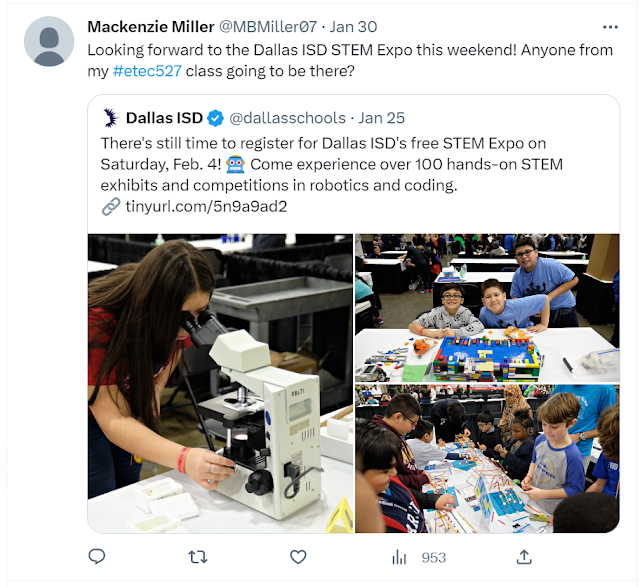
By Their Powers Combined: This week I made a concerted effort to maximize the combined powers of Twitter and YouTube. Coming from a place of near zero public presence on either, this was a tougher journey than I anticipated. Last week I tweeted for the first time since 2011. While I have created and shared more than 50 videos on YouTube, the majority are "Unlisted", meaning they won't show up in a search and can only be viewed by those with whom I share the direct link. My self-style adventure this week involved creating and posting new "Public" videos on YouTube, sharing those videos on Twitter, and attempting to host a "Go Live" streaming event on YouTube, which I promoted on Twitter. Tweetstorming for Reinforcements: Since I know my classmates are following the #etec527 hashtag, I attempted to enlist their help in making this adventure a success. Prior to the ice storm that wrought havoc on most of the schools in North Texas this week. I reached out...

Web 2.0: Rediscovering Twitter

Image
In the beginning:  I created my Twitter account back in 2009 (when the logo still had legs) and last tweeted in 2011, almost 12 years ago (when the logo still had eyes)! It feels weird to be jumping back on this bandwagon so many years later. It was a blast from the past reading my old tweets -- I was traveling a lot for several engineering projects at the time, and mostly tweeted from airports when I got bored. While I followed a few engineering hashtags, I mostly used Twitter to see what businesses my friends were working in or promoting. It was a time of frequent job changes for many, especially somewhat recent grads who had just spread out across the country.  What's new: Looking at Twitter now, I'm excited to see that a few of my old friends are still tweeting, and I get a peek at what careers or projects they are working on now. I wasn't in education last time I was on Twitter, so that opens up a whole new area of interests to explore. I'm also following my class ...